
Location sharing plays a direct role in how quickly and reliably you serve customers. Below we’ll walk you through what counts as Location Sharing today, why it matters, and best practices on how to ensure that your drivers are successfully sharing their location.
We are introducing a new metric called Location Sharing which officially replaces what was previously known as Location Based Tracking (LBT). The definition of this new metric has been refined into three key pillars: Missing Driver ID, Pre-Dispatch, and Post-Dispatch sharing rates. Location Based Tracking previously only focused on data associated with marking a job En Route. The new definition is a more comprehensive view of your GPS sharing behavior.
A job counts toward your Location Sharing score only when it satisfies all three requirements below:
1. There is a driver assigned to the job (Metric to track: Missing Driver ID Rate).
What it means: A unique driver ID must be assigned to every job, to qualify during the selection process. Without it, location data cannot be mapped to a qualified driver.
Action required: Ensure every job is assigned to a unique driver ID (do not allow drivers to share login credentials).
2. Pre-Dispatch Location Data must be known (Metric to track: Pre-Dispatch Sharing Rate)
What it means: We must have location history for every active, available driver within 10 minutes before each job offer—the exact window when the system is calculating ETAs to be used in our selection process.
Action required: Enable live location sharing across all active drivers to ensure we capture their predicted ETA during the selection process.
3. Location Data with Status Updates (Metric to track: Post-Dispatch Sharing Rate)
What it means: Every status update on a job should be done by a driver, when possible. Every status change (En Route, On-Scene, Completed, etc.) must include the driver's current GPS coordinates at that exact moment the status update is made.
Action required: Ensure drivers perform their own status updates in the app with location services turned ON. Avoid manual updates made by dispatchers back in an office.
Where to Track Your Performance
You can monitor these metrics anytime in the Insights Dashboard in Swoop.
Performance Summary Page - the visuals tied to Location Sharing will reflect different values once this change takes effect this week.
Performance Details Page - new visuals are being added to the Location Sharing tab, check out our example video below to find Location Sharing in your Insights Dashboard:
To help continue to ensure accuracy, below are some best practices for Location Based Tracking. You can also find more tips in this separate article.
- Ensure that every job has a driver assigned to enable GPS capture
| iPhone | Android |
 |
|
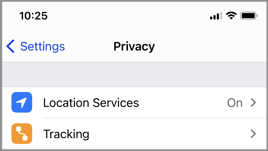
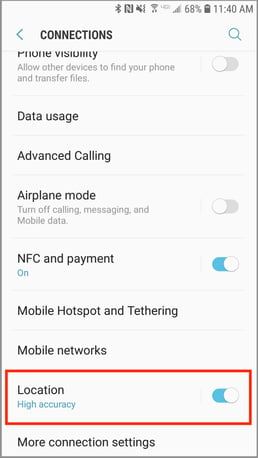
- Keep GPS enabled at all times on your applicable mobile device
- Drivers should regularly update their statuses as they progress through each job
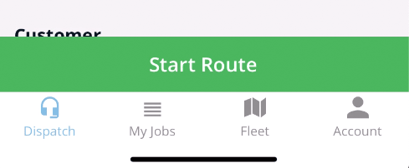
- En route/Start Route means they're on their way to the customer.
-
-
- Note: Because the customer is notified when this action takes place, it's important the driver only starts the job when he is actually on his way to that exact customer.
- We've received complaints from customers who thought the driver was on his way because they could see his truck moving, when in reality, he was making another stop across town before going to that customer. The customer watched the driver cruise for awhile in the opposite direction, causing quite a bit of confusion.
- Generally, though, this notification is a good thing. Since the customer knows where the driver is, they're less likely to call you looking for status updates.
- Note: Because the customer is notified when this action takes place, it's important the driver only starts the job when he is actually on his way to that exact customer.
- On Scene/On Site means they've reached the disablement location.
Have your drivers update their job statuses within your digital dispatch mobile app of choice. Make sure they're updating their status at EACH stage of the event.
-
- Ensure that each driver is only active on one job at a time
What the Customer Sees
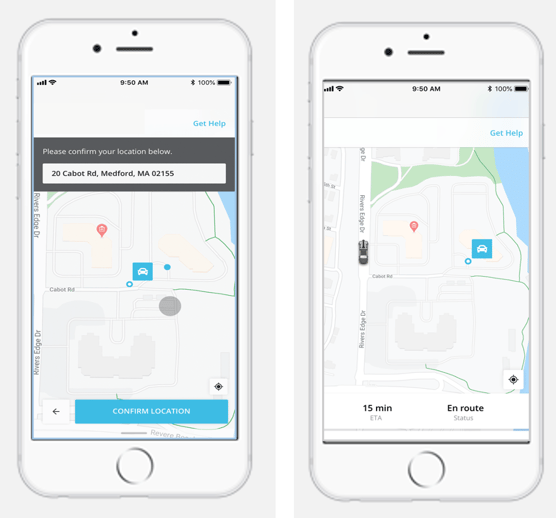
When a job is first created, the customer will be asked to confirm their location. When your driver marks himself en route, the customer is sent a link via text message to view the driver's progress in a web portal. It looks like this:
If you have any questions, please reach out to the Provider Advocate Group by submitting a ticket or live chatting with an agent, both available at info.agero.com/network.