
Real-time visibility is the backbone of the roadside experience. Ensuring your drivers are Always Sharing their location is the easiest way to protect your business, your drivers, and our mutual customers. For more information on how we define Location Sharing as part of your performance metric, check out this separate article here..
Why Location Tracking is a Win-Win-Win
- For Your Business: It drastically cuts down on inbound phone calls for location-status updates, eliminating repetitive check-ins and allowing your dispatch team to focus on other important tasks.
- For Your Drivers: Continuous location sharing is a core requirement that protects both your team and your business. It allows fleet owners to monitor driver locations at all times without distracting them with phone calls while they are on the road. Additionally, providing customers with a live map view reduces their anxiety, leading to safer, higher-rated interactions when your driver arrives.
- For the Customer: It provides peace of mind through real-time visibility. Keeping anxious motorists informed while they wait results in a much smoother, happier interaction for your driver upon arrival.
Baseline Expectation: Run Jobs via the App (No Texts or Phone Calls)
Location tracking functions strictly at the driver level via a mobile application. Drivers must run their jobs through either the Swoop app or an officially integrated third-party dispatch app (like Towbook or Dispatch Anywhere). If your dispatchers are texting or calling drivers with job details instead of dispatching through the approved app, we will not receive any location data.
- Status Updates Are Not Enough: Manually changing a job status on a desktop computer does not activate GPS tracking.
- Run Every Job in the App: To ensure successful tracking, drivers must actively run every single job through their primary dispatch app—with location turned ON.
The "Always Sharing" Checklist
Please ensure your drivers audit their mobile devices against this checklist before every shift. These steps guarantee that their location-status remains visible on the map and that location data flows seamlessly.
- Set Location Permissions to "Allow Always"
- In the phone’s settings, locate the primary dispatch app being used.
- The location permission must be set to "Allow Always" or "Allow All the Time". (Note: Setting this to "Only While Using the App" will cause tracking to stop the moment the driver puts the phone in their pocket or switches to a navigation app).
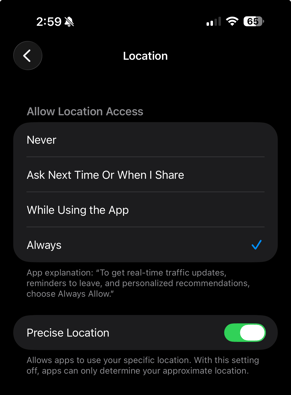
- Turn ON "Precise Location" / "High Accuracy"
- Ensure the "Precise Location" (iOS) or "High Accuracy" (Android) toggle is enabled. This forces the device to use actual GPS hardware rather than relying on rough cellular tower estimates.
- Disable Power Saving Modes
- Turn off "Low Power Mode" or "Battery Saver" during shifts. Standard phone battery savers aggressively freeze background GPS tracking to save power, which immediately takes the driver offline on our maps.
- Enable Unrestricted Background Data
- Ensure the app has permission to use data in the background. This allows the device to continuously send location updates even when the screen is locked.
- Strictly Avoid Dual-App Usage (Do Not Run Swoop + Towbook Simultaneously)
- Both drivers and dispatchers must never run two dispatching applications at the same time on a single device. Running concurrent apps (like Swoop and Towbook) creates an OS-level conflict that corrupts the GPS data stream, making the truck look stuck or offline. If you use a third-party integration, manage the workflow out of that primary system instead of keeping both apps open and active.
- Leverage 3rd-Party Integrations to Prevent Conflicts
- Are you currently using Towbook, Dispatch Anywhere, TraxeroGo or Pulsar? If so, please note that Agero officially integrates with these platforms. To completely avoid dual-app data corruption, you do not need both apps running. Instead, reach out to your specific dispatch platform's support team to ensure your 3rd-party integration is fully turned on and configured. This allows you to manage your workflow safely from a single screen.
- Log Into Only ONE Device
- Drivers should only be logged into a single device at a time (one phone or one tablet). Simultaneous logins under the same driver profile create conflicting GPS streams, scrambling the vehicle's position on the map.
- Keep the App Updated
- Outdated software is a primary cause of location tracking drops. Drivers should check the App Store or Google Play Store regularly to ensure they are running the latest version of their dispatch app.
- Use Unique Driver Credentials (Do Not Share Logins)
- Every driver must have their own unique username and password for the dispatch application. Never allow drivers to share a single, generic set of credentials. This creates an OS-level "tug-of-war" where the system receives conflicting GPS coordinates from different trucks simultaneously. This completely corrupts the tracking data, causing the vehicle's icon to wildly jump across the map or freeze entirely.
- For Swoop Users: Correct Job Assignment & Permissions
- Our tracking system only collects and associates GPS data from the specific driver assigned to the job. If you are an Admin or Dispatcher who is also physically running the job, you must properly assign the job to yourself for location sharing to work.
- Assign the Job to Your Exact Profile: Ensure the job is explicitly assigned to the exact username you used to log into the Swoop app. You must put yourself "On-Duty" and manage the call entirely from the "My Jobs" tab. If the job is not assigned to you, the system will not pull your GPS coordinates.
- Verify Your Driver Permissions: If you cannot assign the job to yourself, your admin account is likely missing driver privileges. To fix this:
- Go to the Swoop Users tab.
- Locate your profile and ensure the "Driver" permission is toggled ON at the user level.
- Once updated, assign the job to yourself so your live location stream activates.
- Keep the Phone Plugged Into a Charger
- Heavy GPS tracking drains phone batteries rapidly. A dying phone will often automatically disable location services to survive, so keeping the device on a high-output in-cab charger is highly recommended.