
Location sharing plays a direct role in how quickly and reliably you serve customers. Below we’ll walk you through what counts as Location Sharing today, why it matters, and best practices on how to ensure that your drivers are successfully sharing their location.
Location sharing is part of Agero's provider selection logic. It’s critical that all of your drivers are GPS enabled, we now use their location if it’s better than your Rate Agreement ETA. In the near future we will prioritize providers whose drivers are sharing GPS.
Location Sharing which officially replaces what was previously known as Location Based Tracking (LBT). The definition of this new metric has been refined into three key pillars: Missing Driver ID, Pre-Dispatch, and Post-Dispatch sharing rates. Location Based Tracking previously only focused on data associated with marking a job En Route. The new definition is a more comprehensive view of your GPS sharing behavior.
A job counts toward your Location Sharing score only when it satisfies all three requirements below:
1. There is a driver assigned to the job (Metric to track: Missing Driver ID Rate).
What it means: A unique driver ID must be assigned to every job, to qualify during the selection process. Without it, location data cannot be mapped to a qualified driver.
Action required: Ensure every job is assigned to a unique driver ID (do not allow drivers to share login credentials).
2. Pre-Dispatch Location Data must be known (Metric to track: Pre-Dispatch Sharing Rate)
What it means: We must have location history for every active, available driver within 10 minutes before each job offer—the exact window when the system is calculating ETAs to be used in our selection process.
Action required: Enable live location sharing across all active drivers to ensure we capture their predicted ETA during the selection process.
3. Location Data with Status Updates (Metric to track: Post-Dispatch Sharing Rate)
What it means: Every status update on a job should be done by a driver, when possible. Every status change (En Route, On-Scene, Completed, etc.) must include the driver's current GPS coordinates at that exact moment the status update is made.
Action required: Ensure drivers perform their own status updates in the app with location services turned ON. Avoid manual updates made by dispatchers back in an office.
Where to Track Your Performance
You can monitor these metrics anytime in the Insights Dashboard in Swoop.
Performance Summary Page - the visuals tied to Location Sharing will reflect different values once this change takes effect this week.
Performance Details Page - new visuals are being added to the Location Sharing tab, check out our example video below to find Location Sharing in your Insights Dashboard:
To help continue to ensure accuracy, below are some best practices for Location Based Tracking. You can also find more tips in this separate article.
- Ensure that every job has a driver assigned to enable GPS capture
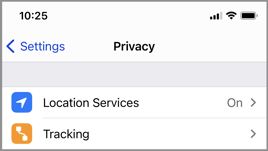
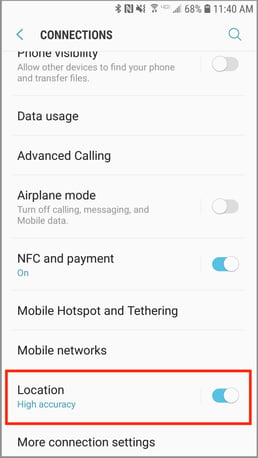
| iPhone | Android |
 |
|
- Keep GPS enabled at all times on your applicable mobile device
- Drivers should regularly update their statuses as they progress through each job
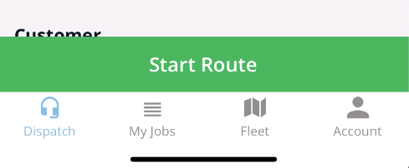
- En route/Start Route means they're on their way to the customer.
- GOA / Unsuccessful Jobs: Starting in Q4 of 2026 we will be strictly enforcing GPS proof of your on-site status for both GOA and Unsuccessful jobs. Without GPS proof of your on-site status, partial payments will no longer be eligible on those jobs, and these invoices will be reflected as “Non Billable” on the Invoice tab.
-
-
- Note: Because the customer is notified when this action takes place, it's important the driver only starts the job when he is actually on his way to that exact customer.
- We've received complaints from customers who thought the driver was on his way because they could see his truck moving, when in reality, he was making another stop across town before going to that customer. The customer watched the driver cruise for awhile in the opposite direction, causing quite a bit of confusion.
- Generally, though, this notification is a good thing. Since the customer knows where the driver is, they're less likely to call you looking for status updates.
- Note: Because the customer is notified when this action takes place, it's important the driver only starts the job when he is actually on his way to that exact customer.
- On Scene/On Site means they've reached the disablement location.
Have your drivers update their job statuses within your digital dispatch mobile app of choice. Make sure they're updating their status at EACH stage of the event.
-
- Ensure that each driver is only active on one job at a time
What the Customer Sees
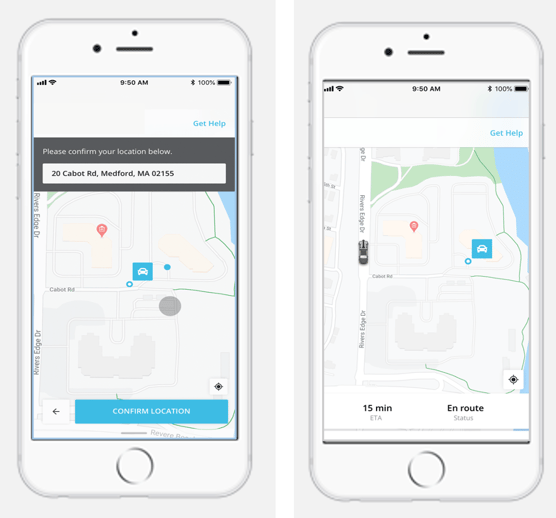
When a job is first created, the customer will be asked to confirm their location. When your driver marks himself en route, the customer is sent a link via text message to view the driver's progress in a web portal. It looks like this:
ETA Accuracy Powers a Better Customer Experience: Introducing Our Updated Scoring Framework
Accurate ETAs and real-time location sharing play a direct role in how quickly, reliably, and successfully you serve motorists. Following our recent update to Location Sharing, we are taking the next step to improve network transparency and performance tracking by introducing an updated ETA Accuracy metric.
We are launching this updated scoring model in your Insights Dashboard first to give your team full, early visibility into your performance. This advance window allows you to see where you stand, review the data with our team, and fine-tune operations before these scores are factored into provider selection and dispatch volume in the coming months.
What’s Changing: 0-100 Scoring Model
Previously, ETA Accuracy was measured as a percentage. Starting this week, how we measure ETA accuracy is transitioning to a 0–100 score calculated at the individual job level.
Note: The previous binary calculation has been replaced with this new view. It is visible for tracking today, but is not yet active in provider selection.
- Target Window: Aim to arrive as close to your initial ETA as possible.
- Early vs. Late: Arriving too early or too late both can disrupt customer schedules, to avoid deductions do your best to give an accurate initial ETA.
- An Automatic ‘0 Score’: Jobs marked completed without verification, reassigned, or canceled due to major delays will directly impact your score down to zero.
Automated On-Site Verification
We’ve expanded the arrival verification beyond status updates to maximize capture of valid on-scene arrivals. Arrival is now validated using the earliest of:
- Driver Status: Drivers must mark On-Site in the Swoop or Towbook app once actually on-scene.
- Geotagged Photos & Signatures: Pick-up photos or digital customer signatures should be captured while on-scene, even if offline.
- Customer Confirmation: The motorist confirming arrival via SMS.
Please remind drivers to wait until they have physically arrived on-scene before tapping On-Site so coordinates validate correctly.
What This Means for Your Volume
While this score is not yet tied to dispatch selection, it will in the next few months. Missed ETAs remain the #1 customer complaint, and using this preview period to coach your team protects your business:
- More Jobs for Accurate Providers: Our selection logic prioritizes drivers sharing live GPS with accurate ETAs over standard, blanket times.
- Missed ETAs are the #1 customer complaint: Running consistently behind leads to reassignments, lower completion rate, and reduced dispatch offers.
- Driver Status = Customer Visibility: When drivers update status directly from their phone, motorists receive live tracking links - cutting inbound calls and keeping drivers focused on the road.
Where to Find this Data in Your Insights Dashboard
- Performance Summary Page: Visuals updated with the new 0–100 ETA Accuracy score.
- Performance Details Page (ETA Accuracy Tab): Detailed breakdowns by driver, service type, and zip code, plus verified on-site source tracking.
- Raw Job Data: Individual ETA scores added to your exportable job tables.
Check my score (link to Insights Dashboard)
🎥 Insights Dashboard Walkthrough
Watch this quick walkthrough demonstrating where to locate the new ETA Accuracy tab and navigate driver-level breakdown cards in your Insights Dashboard.
If you have any questions, please reach out to the Provider Advocate Group by submitting a ticket or live chatting with an agent, both available at info.agero.com/network.